Let Claude Code, Codex, and opencode work together
Let any coding agent start Claude Code, Codex, or opencode in its own worktree, hear back when it's done, and read what it found.
Short answer
For Claude Code, Codex, and opencode to work together, one agent needs a way to start another, hear back when it is done or stuck, and read what it found. Each vendor offers this inside its own harness (Claude Code's Agent Teams, Codex subagents), and OpenAI's codex-plugin-cc lets Claude Code hand work to Codex. Spaces exposes those steps as MCP tools that any of the three can call: spawn an agent of any harness in its own workspace, subscribe to its status, read its brief, and type into its terminal.
At a glance
Harnesses
Direction
Separate worktrees
How the lead hears back
Agent Teams
Claude Code only
A lead Claude Code session spawns teammates; teammates can't spawn teammates
No: teammates share one directory (subagents can opt in with isolation: worktree)
Teammates share a task list and message each other directly; subagents report results back to their session
Codex subagents
Codex only
Codex spawns Codex subagents
No option documented: subagents share the parent's sandbox, and OpenAI warns parallel edits can conflict
Results are collected in one response
codex-plugin-cc
Claude Code calling Codex
One way: Claude Code calls Codex
No: Codex works in the same checkout as Claude Code
/codex:status and /codex:result for jobs running in the background
tmux scripts
Anything
Whichever way you script it
Only if your script runs git worktree add
You write the part that decides whether an agent is done, stuck, or still thinking
Spaces
Claude Code, Codex, opencode
Any of the three can lead and spawn any other
Yes: each agent gets its own workspace, a separate git worktree on its own branch
A short event block typed into the lead's terminal when a watched agent goes blocked, done, or exits, then the agent's brief to read
What exists today
Claude Code subagents and Agent Teams
Subagents run inside one Claude Code session and report their results back to it. Agent Teams go further: a lead Claude Code session spawns teammates, each a separate Claude Code instance with its own context, which coordinate through a shared task list (with file locking when they claim tasks) and message each other directly.
Agent Teams are experimental and off by default; you turn them on with CLAUDE_CODE_EXPERIMENTAL_AGENT_TEAMS=1. Anthropic's docs list the current limits: in-process teammates aren't restored when you resume a session, a session has one team, teammates can't spawn teammates of their own, and teammates' permission prompts appear in the lead session. Split panes need tmux or iTerm2. Every teammate is Claude Code.
Codex subagents
Codex can spawn specialized agents in parallel and collect their results in one response. You define custom agents as TOML files in ~/.codex/agents/ or a project's .codex/agents/. Every subagent is Codex.
codex-plugin-cc
OpenAI's official Claude Code plugin adds /codex:review, /codex:adversarial-review, and /codex:rescue (which hands a task to Codex through a subagent), plus /codex:status and /codex:result for jobs running in the background. If what you want is a Codex review from inside Claude Code, this is the shortest path. It goes one way: Claude Code calls Codex.
tmux scripts
The do-it-yourself version puts agents in tmux panes, uses tmux send-keys to type into one and tmux capture-pane to read it. It works with anything. You write the part that decides whether an agent is done, stuck, or still thinking.
Each of these is limited to one harness, works in one direction, or depends on glue you maintain.
What Spaces adds
Spaces ships an MCP server, spaces mcp, that Claude Code, Codex, and opencode can each connect to. You register it once per harness: claude mcp add spaces -s user -- spaces mcp for Claude Code, an [mcp_servers.spaces] table in ~/.codex/config.toml for Codex, and an mcp entry in ~/.config/opencode/opencode.json for opencode. See MCP setup.
These are the tools that matter for agents working together:
Tool
What it does
spaces_workspace_create, spaces_workspace_start
Create a workspace (a git worktree on its own branch) and make sure it is running.
spaces_agent_spawn
Start claude, codex, or opencode in a fresh terminal in a workspace. It returns once the agent is running and sends no prompt. A first-run trust or sign-in prompt may still need an answer, which the lead can see with spaces_terminal_tail.
spaces_terminal_send
Type into a terminal. With submit, the text goes in as a paste followed by a separate Enter, so all three agents run it.
spaces_agent_subscribe
Get told when an agent goes blocked, done, or exits. Spawning from a Spaces terminal subscribes that terminal to the child.
spaces_agent_brief_read
Read the brief an agent keeps: a short markdown status page about its own work.
spaces_agent_status, spaces_terminal_tail
An agent's current state, or its recent output.
spaces_agent_kill
End an agent and its terminal.
Every one of them takes an optional device, so a lead agent on your Mac can spawn and watch agents on a paired Linux server.
Two details make this work across harnesses:
Status comes from each agent's own hooks. Spaces installs small hooks into Claude Code, Codex, and opencode that report working, blocked, and done (see Agent status). The MCP tools don't include the command those hooks call, so one agent can read another's status but can't set it.
Events arrive as the lead's next message. When a watched agent changes state, Spaces types a short block into the lead's terminal, and only while the lead is idle, so it never lands mid-turn. If the lead is busy, the events ride along on the result of its next Spaces tool call instead. Subscriptions belong to a terminal, so the lead has to run in a Spaces terminal.
Worked example: Claude Code asks Codex for a review
The setup: Claude Code is running in a Spaces terminal in the login-fix workspace. Both Claude Code and Codex have the Spaces MCP server registered and the status hooks installed (Codex runs hooks only after you trust them; the Trust in Codex button in Settings → Coding Agents does that).
Claude Code finishes the change and commits it on login-fix.
It makes a review workspace from that branch. It calls spaces_workspace_create with the project and branch: "login-fix-review", plus baseBranch: "login-fix" (baseBranch is optional), then spaces_workspace_start. On the same machine, workspaces share the project's one clone, so the new worktree has Claude's commits without a push. Another machine (device) has its own clone, so Claude Code pushes login-fix first; that machine fetches the branch from your git remote when it creates the workspace, and Claude Code then looks up the new workspace's id there with spaces_workspace_list.
It spawns Codex there.spaces_agent_spawn with command: "codex" and the review workspace's id. The call returns once Codex is running, with Codex's session id, and Claude Code's terminal is now subscribed to it. Codex may still be at a first-run trust or sign-in prompt that needs an answer, which Claude Code can see with spaces_terminal_tail.
It sends the task.spaces_terminal_send with submit: true and text like: "Review the commits on this branch against main for correctness and missed edge cases. Don't edit files. Put your findings in your brief with spaces_agent_brief_write: a one-line headline, then each finding by severity with file and line."
It goes idle. When Codex finishes its turn, a block in this shape arrives in Claude Code's terminal:
[spaces] Codex (codex) is done
  project: <project name>
  workspace: <path to the login-fix-review worktree>
  branch: login-fix-review
  session: <Codex's session id>
  brief: <the first line of Codex's brief>
  link: spaces://terminal/<Codex's session id>
The done event as it lands in the lead's terminal. Here the lead runs on the Mac and Codex on a paired server; the lead then reads Codex's brief.
It reads the review.spaces_agent_brief_read with Codex's session id returns the full brief.
It fixes and follows up. Claude Code fixes what it agrees with in its own worktree, commits, and sends Codex a second message: "I committed fixes on login-fix. Merge login-fix into your branch and re-check findings 1 and 3." With Codex on another machine, Claude Code pushes the fixes first and asks Codex to fetch and merge origin/login-fix. When Codex finishes, another done event arrives with a brief to read.
It cleans up.spaces_agent_kill ends Codex once the review is settled, and you can delete the review workspace.
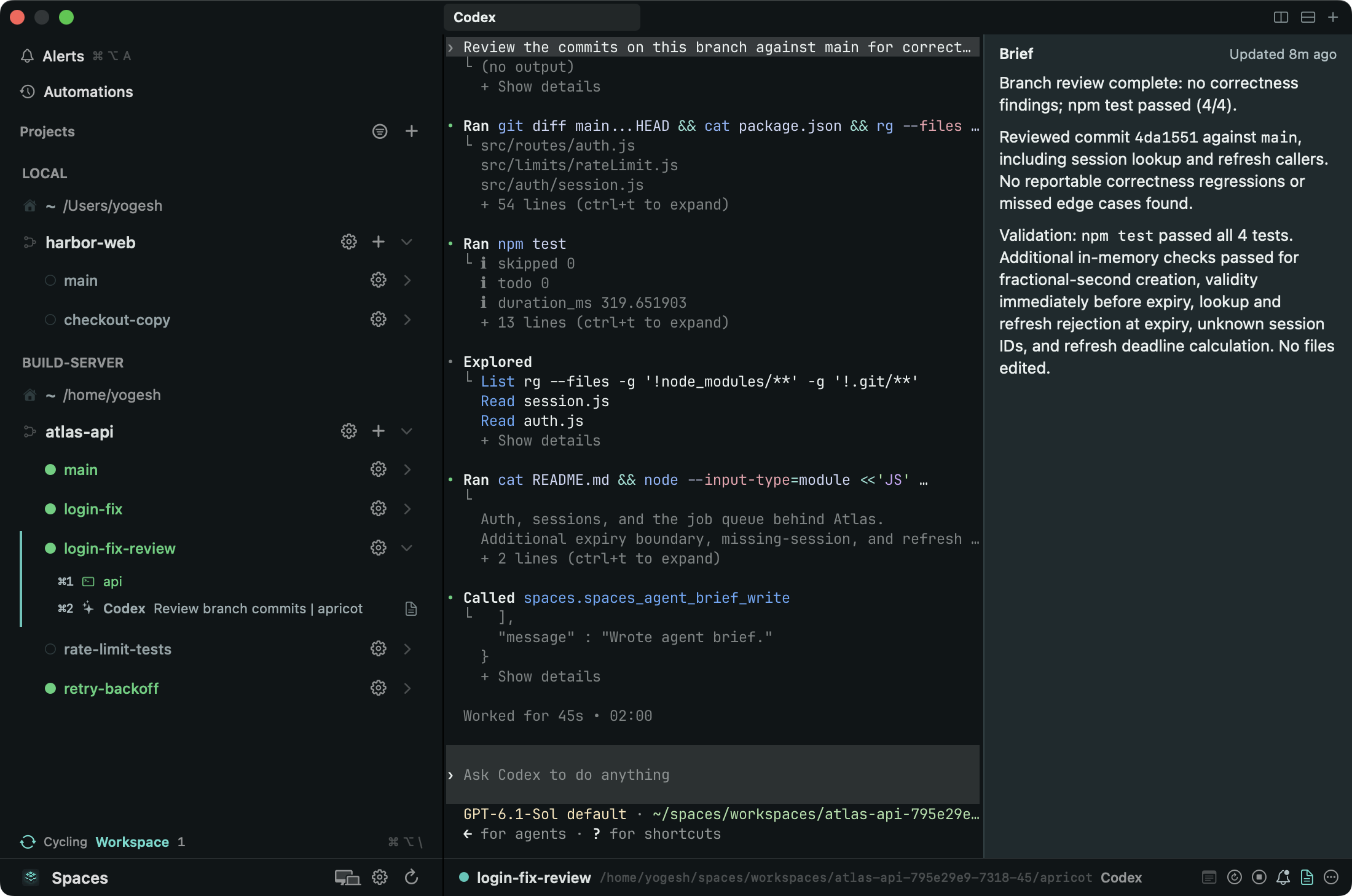
The child's own view: Codex in its review workspace on the server, with the brief the lead reads.
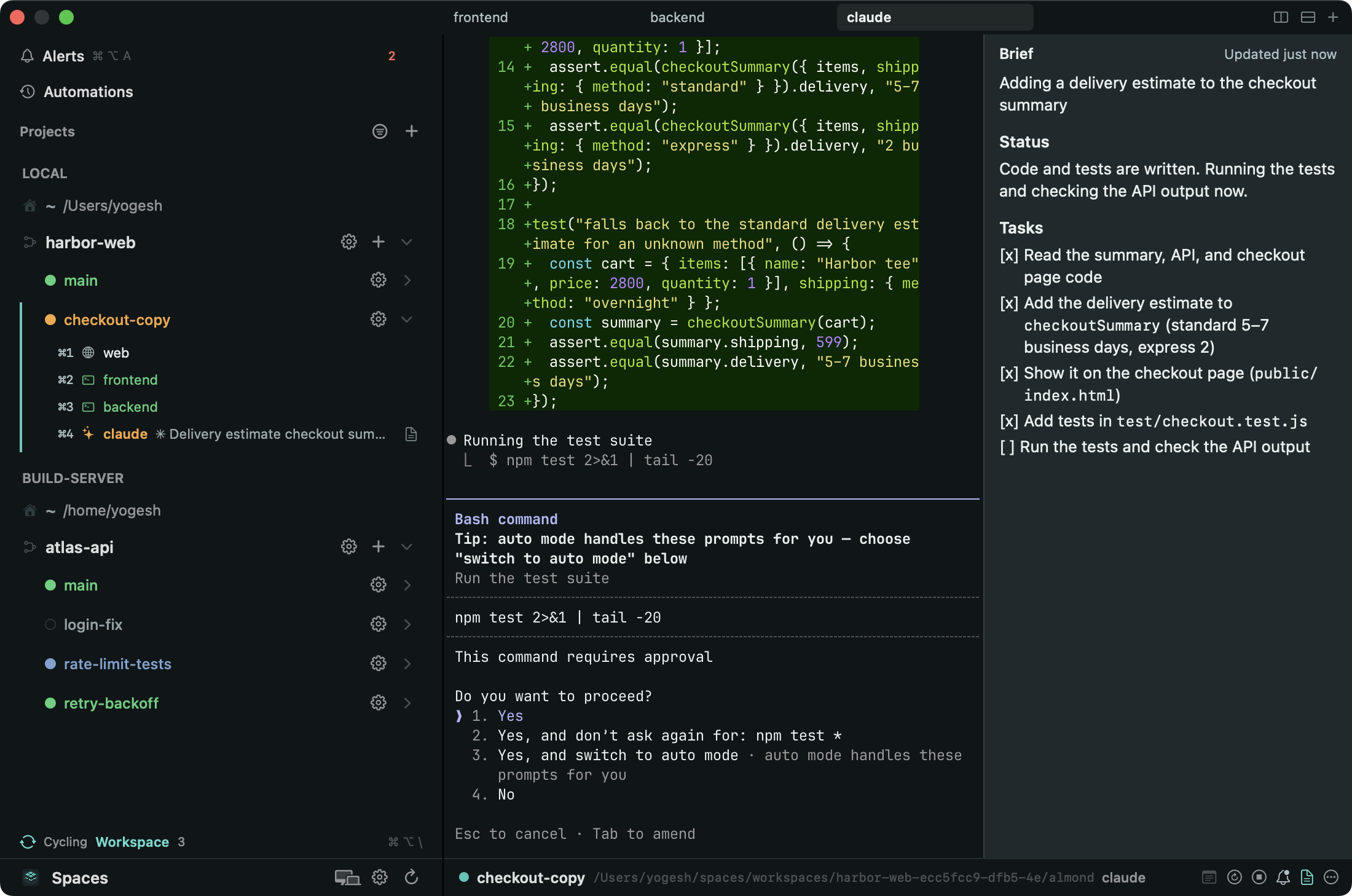
If Codex stops at a permission prompt instead, the event says is blocked. The orchestration playbook tells the lead to read the child's recent output and either answer it or bring the question to you, and never to approve a destructive action itself.
Any of the three can lead: Codex can spawn Claude Code to write tests, and opencode can spawn both. The playbook is a prompt you paste into whichever agent leads.
Each agent in its own worktree
Anthropic's Agent Teams docs warn that "two teammates editing the same file leads to overwrites." Claude Code subagents can opt in to a separate worktree with isolation: worktree, but Agent Teams teammates cannot. Spaces avoids that by giving each agent its own workspace: a separate git worktree on its own branch, with its own ports and URLs for the project's services, so two agents can run the same dev server without colliding. See Workspaces.
Merging is left to you or the lead agent, with git as usual. There is no shared task list and no file locking; the lead coordinates the work with spawn, send, and the events it gets back.
Staying in the loop
Every child runs in a terminal you can open in the app.
On the Mac, each agent is a row under its workspace showing its state, whichever machine it runs on. The brief shows beside the agent's terminal. Alerts lists the agents that are blocked or done, and a shortcut jumps to any agent's pane.
On the iPhone, the Agents tab groups every running agent across your paired machines as Blocked, Done, and Working. See Run coding agents from your iPhone.
You can step in. Open any child's terminal from the Mac or the phone and type into it yourself. The lead keeps working and sees the child's next state change like any other.
On the Mac, an agent's brief sits beside its terminal.
Agents keep running in the Spaces service on their machine whether or not the app is open. There are no push notifications; a stuck child shows in Alerts the next time you look.
What it costs
More agents cost more. Each agent is a full session with its own context. Anthropic says Agent Teams "use significantly more tokens than a single session," and OpenAI says subagent workflows "consume more tokens than comparable single-agent runs." Spawning across harnesses also bills against each vendor's plan or API key.
One public data point: in an XDA Developers test published in July 2026, with Claude orchestrating Codex through codex exec, Claude used over 9 million tokens and Codex about 1.2 million, and the author notes that planning, reviewing, implementing, and verifying "takes longer than a single agent would." In the same test, Claude re-ran checks rather than accept Codex's report that tests passed. Treat any child's report the same way, and check it, or have the lead check it, before relying on it.
On team size, Anthropic's Agent Teams docs suggest starting with 3 to 5 teammates for most workflows; the same range is a starting point for any set of agents whose work you plan to review.
When something else fits better
One small task: use one agent.
Edits tightly coupled in the same files: use one agent. Splitting the work across worktrees moves the conflict to the merge.
You use only Claude Code and want a shared task list: use Agent Teams.
You only want a Codex second opinion from Claude Code: use codex-plugin-cc.
The work fits inside one Codex session: use Codex subagents.
Spaces fits when you want different harnesses on the same piece of work, children on another machine, or a set of agents you can watch and take over from your Mac and your phone.
Agent Teams: experimental and off by default (CLAUDE_CODE_EXPERIMENTAL_AGENT_TEAMS=1); teammates are separate Claude Code instances; shared task list with file locking on task claims; mailbox messaging; limitations (no session resumption with in-process teammates, one team per session, no nested teams, split panes need tmux or iTerm2); teammate permission prompts appear in the lead session; "use significantly more tokens than a single session"; "Start with 3-5 teammates for most workflows"; "Two teammates editing the same file leads to overwrites"; subagents work within a single session: https://code.claude.com/docs/en/agent-teams (fetched 2026-10-01)
Codex subagents: spawn specialized agents in parallel and collect results in one response; custom agents as TOML in ~/.codex/agents/ or .codex/agents/; "subagent workflows consume more tokens than comparable single-agent runs": https://learn.chatgpt.com/docs/agent-configuration/subagents (fetched 2026-10-01; developers.openai.com/codex/subagents redirects here)
codex-plugin-cc: "Use Codex from inside Claude Code for code reviews or to delegate tasks to Codex"; commands /codex:review, /codex:adversarial-review, /codex:rescue, /codex:status, /codex:result; background jobs: https://github.com/openai/codex-plugin-cc (fetched 2026-10-01)
XDA Developers, Joe Rice-Jones, "Claude orchestrating Codex agents is the workflow I didn't know I needed for coding", July 29, 2026: Claude orchestrating Codex via codex exec; "In total, it used over 9 million tokens, while Codex used about 1.2 million"; "takes longer than a single agent would"; Claude verified Codex's claims instead of accepting them: https://www.xda-developers.com/claude-orchestrating-codex-agents/ (fetched 2026-10-01)

![Claude Code's terminal on the Mac showing a [spaces] Codex (codex) is done block for the login-fix-review workspace on build-server, followed by Claude Code quoting Codex's brief.](/media/mac-event.png)