Run coding agents on a remote server and keep them running
Keep Claude Code, Codex, and opencode running on a Linux server after you disconnect, and bring them back with one Restore after a reboot.
Short answer
To keep a coding agent running on a remote server, run it inside something that outlives your SSH connection, and plan for how it comes back after the server restarts. tmux covers the first part for any agent; nothing keeps a process alive through a reboot. Spaces runs Claude Code, Codex, and opencode inside the Spaces service on your Linux server, shows them next to your Mac's agents on your Mac and iPhone, and after a reboot or crash brings them back with one Restore, resuming each conversation where the agent supports it.
At a glance
Agents it covers
Keeps running when you disconnect
After a reboot
Shows which agent needs you
tmux over SSH
Any agent
Yes: the session lives on the server and you reattach later
Every process ends, tmux included, and you start each agent again by hand (tmux-resurrect can relaunch programs, but claude or codex starts a new conversation unless you resume it yourself)
No: you attach to each window and look
systemd units
One-shot jobs such as claude -p, codex exec, and opencode run
Yes: runs without a terminal
An enabled unit starts again at boot, but a one-shot job starts a new conversation unless its command resumes one (claude -p --resume, codex exec resume)
No: a headless run has no prompt to answer; you read its exit code and logs
The vendors' remote features
Each covers its own agent only
Remote Control: only if you start the session inside tmux or screen. Codex Remote: the Mac or Windows PC running the Codex app must stay awake and online
Not on their own: start claude remote-control again (--continue brings the session back within about four hours) and reopen the Codex app on the host
Yes, for its own agent: push notifications when a task finishes or needs a decision
Cloud agents
Claude Code on the web, Codex Cloud: one agent each
Yes: Claude's VM keeps running after you close your laptop, and Codex Cloud keeps working while your computer is asleep
No server of yours to reboot
Claude: a session list at claude.ai/code and in the Claude app. Codex Cloud: not documented
Spaces
Claude Code, Codex, opencode
Yes: agents live in the Spaces service on the server, and the Mac and iPhone apps attach and detach
One Restore brings the agents back, resuming each conversation where the agent supports it
Yes: working, waiting, and done states beside your Mac's agents, and alerts in the same Alerts list
Why agents stop on a server
Three different events end an agent, and each needs a different fix.
Your laptop closes. An agent running on the laptop stops with it. Moving the agent to a server fixes this.
Your SSH connection drops. An agent started in a plain SSH shell usually ends with the connection. tmux or screen fixes this: the session lives on the server, and you reattach later.
The server restarts or crashes. Every process on it ends, tmux included. The tmux-resurrect plugin exists because, in its own words, "you lose all the running programs, working directories, pane layouts etc." when the machine restarts. It can relaunch the programs, but relaunching claude or codex starts a new conversation unless you resume the old one yourself.
A fourth problem is visibility. With an agent in each of three tmux windows, the only way to know which one needs you is to attach and look.
The usual options
tmux on a server, over SSH and Tailscale
The standard setup: a small Linux server, Tailscale so SSH isn't open to the internet, one tmux window per agent, and an SSH client on your laptop and phone. It is cheap, works with any agent, and has nothing proprietary in it. You own the setup on every machine, you attach to each window to check on it, and after a reboot you start each agent again by hand.
systemd for unattended runs
For one-shot jobs like claude -p, codex exec, or opencode run, a systemd unit or timer runs the job without a terminal and can restart it on failure. That suits batch work. It doesn't give you an interactive session to answer an agent's questions in.
The vendors' remote features
Claude Code's Remote Control lets you steer a session from your phone or browser, but the session runs wherever you started claude, and Anthropic's docs say that to keep it running on a remote machine after you disconnect from SSH, you "start it inside tmux or screen." Codex Remote can work on an SSH host, but through a Mac or Windows PC running the Codex app, which has to stay awake and online. Each covers its own agent only.
Cloud agents
Claude Code on the web runs each session on an Anthropic-managed VM that keeps running after you close your laptop. Codex Cloud runs tasks in OpenAI-managed containers that keep working while your computer is asleep. You don't maintain a server at all. In exchange, both are built around GitHub repositories and run in the vendor's environment rather than on a machine with your own tools and network. Claude's cloud sessions also stop after a period of inactivity; reopening one restores the conversation on a fresh VM, but background work such as subagents and shell commands isn't restored. They share your plan's rate limits.
How Spaces runs agents on a server
You install the Spaces service on the server and pair it from your Mac once. From then on the server is part of the app.
Install. On a Linux server with systemd (x86_64 or arm64; Ubuntu, Debian, Fedora, and AlmaLinux are tested), run curl -fsSL https://usespaces.dev/install.sh | bash. The installer registers the Spaces service as a systemd user service and enables lingering, so it keeps running with no one logged in. You can also skip this step: pairing over SSH installs Spaces on a Linux machine that doesn't have it yet.
Pair. In the Mac app, open Settings → Devices → Add remote device over SSH, or run spaces device pair --ssh user@host. SSH has to work without prompts: key-based access, with the server's host key already recorded.
Connect. After pairing, your Mac and iPhone talk to the Spaces service on the server directly, on port 47847. Terminals and agents never go through SSH. SSH is still used for remote browser sessions and for opening a workspace in an external editor such as VS Code or Zed. The docs recommend putting the server, the Mac, and the phone on one Tailscale tailnet, so neither port has to be open to the internet. See Tailscale.
Run. Every terminal you open on the server, and every agent in it, lives in the Spaces service there. The Mac app and the iPhone app attach and detach.
The server appears in the Mac sidebar as its own section beside Local, with its projects, workspaces, terminals, and agents. Its agents show the same working, waiting, and done states as the ones on your Mac, and its alerts land in the same Alerts list.
A paired server sits in the same sidebar as your Mac, in its own section beside Local.
Walkthrough: three agents on a server, then close the laptop
Pair the server as above. Then, in the Mac app, Settings → Coding Agents installs the status hooks for Claude Code, Codex, and opencode on the server, the same as on your Mac. Install and sign in to each agent's CLI on the server itself: Spaces runs whatever is installed there, in your login shell, with your PATH.
Add the project on the server. Choose New project, pick the server as the device, then give a folder path on it or a git URL to clone there.
Create a workspace per task, for example fix-flaky-auth-test, upgrade-next, and docs-search. Each one is a git worktree on its own branch.
Start an agent in each. Open a terminal in the workspace (⌘⌥T) and run claude in the first, codex in the second, and opencode in the third. Each appears under Coding Agents in its workspace with its state.
Close the laptop. The agents keep running on the server.
Check from your phone. The Spaces iPhone app's Agents tab shows all three; tap one to open its terminal and answer it. See Run coding agents from your iPhone.
When you open the laptop again, the Mac reconnects when it wakes, and its panes reattach to the same sessions with whatever output arrived while you were away. If the server can't be reached, its panes keep the last screen and show "Reconnecting…", then "Device unreachable" with a Retry button, and its rows stay listed, dimmed, on both the Mac and the iPhone, until it answers again.
After a reboot, a crash, or a power loss
Restarting the server ends every terminal, process, and agent on it. Their panes stay open and read-only.
The server keeps a record of the agents whose work was cut short by a restart or shutdown, by the Spaces service crashing, or by a power loss, which the service detects at its next start. An agent or workspace you stop yourself isn't recorded.
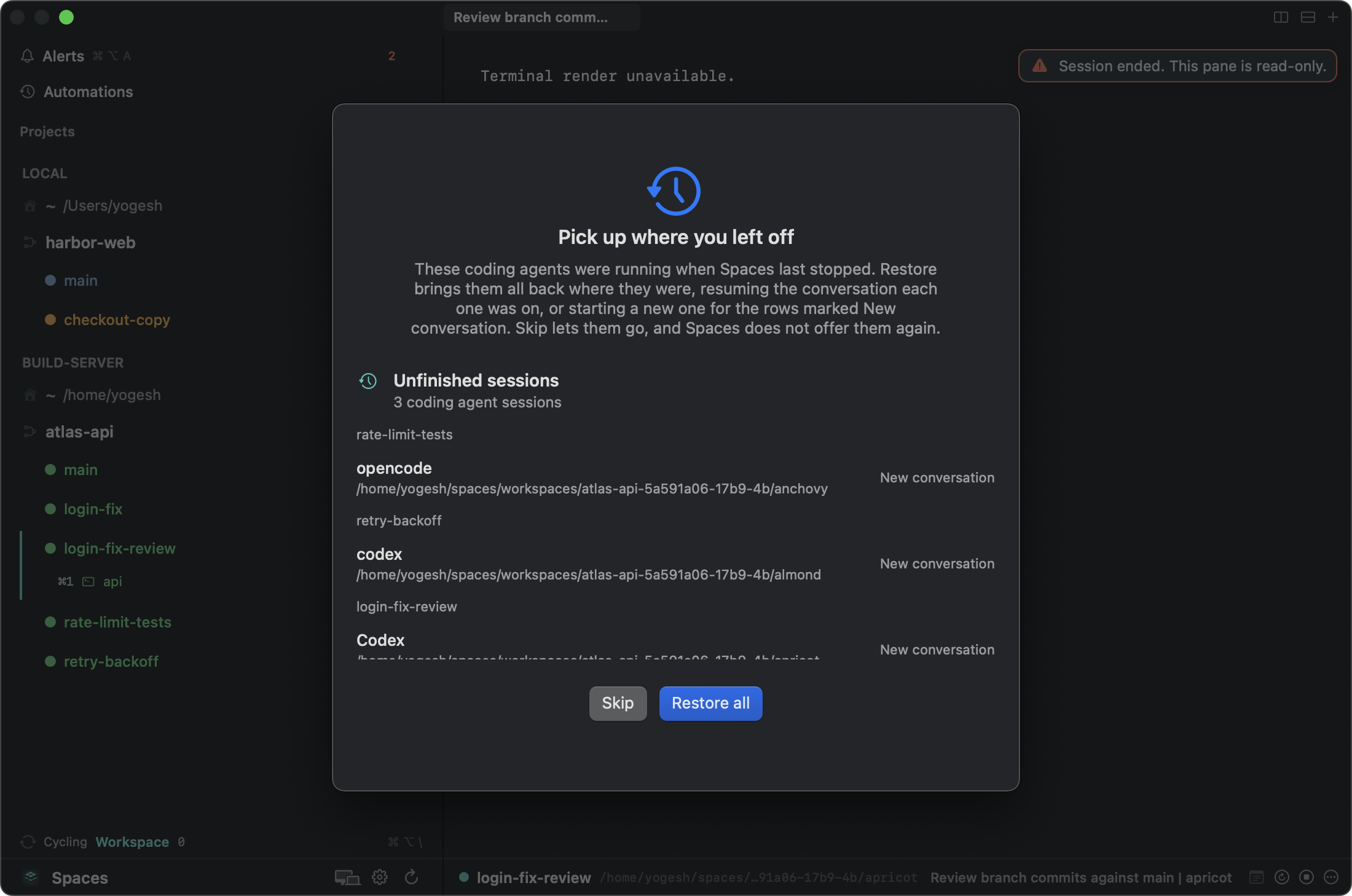
When the server is back and its Spaces service reports the record, the Mac offers "Pick up where you left off", as a sheet while Spaces is running or as a step when it launches, listing the agents by workspace with Restore all and Skip. The iPhone shows the same offer for the machine it's connected to.
The server's Spaces service went down with three agents running. When it came back, the Mac offered them by workspace.
Restore all relaunches each agent in its workspace and directory, with its original command and options, back in the pane it held. What comes back depends on the agent:
An interactive Claude Code, Codex, or opencode session that reported a conversation it can resume picks that conversation back up, and isn't sent its starting prompt again.
An agent that never finished a turn, or reported no conversation, comes back as a fresh conversation running its original command, prompt included. The sheet marks these "New conversation".
One-shot runs (claude -p, codex exec, codex review, opencode run) and codex fork come back as fresh runs. opencode run -i resumes.
Environment variables typed before the command, as in FOO=1 claude, are not carried over.
Restore doesn't start workspaces, so dev servers and other configured processes stay stopped until you press Start. An agent that can't come back, for example because its directory is gone, is named with the reason, and the rest come back anyway. Skip drops the record, and Spaces won't offer those agents again. Either answer, from either device, settles it for every client.
Updating Spaces doesn't end your agents' sessions. Rerunning the installer with a version hands the running sessions to the updated service in place, and the Mac offers an "Update over SSH" action for a server paired over SSH. See What survives a restart.
One task, one worktree
Several agents on one server need separate checkouts and separate ports. Each Spaces workspace is a git worktree on its own branch, sharing the project's one clone, so two agents never edit the same checkout.
Each workspace also gets its own port for every service the project declares, assigned from 20000 to 30000 and held for the workspace's life, and handed to processes as variables like SPACES_WEB_PORT. Three branches can run the same dev server side by side on the same server. On the Mac, each service has a stable URL such as http://web.<workspace-slug>.localhost:7391; for a workspace on the server, the Mac forwards the port over SSH and serves that same URL. Because every workspace has its own hostname, cookies and local storage don't carry over between branches. On the iPhone, a browser session opens in the app's own browser, straight from the server. See Services and URLs.
What you still own
Spaces runs and tracks the agents on the server. The rest of the server is yours:
The server. Provider, size, OS updates, disk space, and backups are yours.
Its network exposure. Tailscale is the setup the docs recommend. Pairing over a public address instead means opening TCP 22 and 47847 to the addresses you connect from. Spaces doesn't replace a VPN or a firewall.
Who can pair. Pairing gives a client full control of that server's Spaces service, so pair only your own devices.
Credentials on the server. Each agent signs in there, and the git credentials it pushes with live there too.
Uptime. Restore brings agents back after a reboot, but anything a process held only in memory is lost.
The platforms. The server is a Linux machine with systemd (Ubuntu, Debian, Fedora, and AlmaLinux are tested) or another Mac. The clients are the Mac app and the iPhone and iPad app on the App Store. There is no Windows or Android support and no web client.
When something else fits better
You'd rather not run a server, your code is on GitHub, and you use one agent: Claude Code on the web or Codex Cloud.
You use Codex and already keep the Codex app on an always-on Mac or Windows PC: Codex Remote with an SSH host.
You run unattended batch jobs that nobody needs to answer: systemd timers, or Spaces automations if you want those runs listed beside your interactive agents.
You run one agent on one server and tmux already does the job: keep tmux.
tmux-resurrect, "Persists tmux environment across system restarts", and the quote "you lose all the running programs, working directories, pane layouts etc.": https://github.com/tmux-plugins/tmux-resurrect (fetched 2026-10-01)
Remote Control runs on your machine, "your computer has to stay on and the claude process has to keep running", and "To keep a session running on a remote machine after you disconnect from SSH, start it inside tmux or screen": https://code.claude.com/docs/en/remote-control (fetched 2026-10-01)
Claude Code cloud sessions: Anthropic-managed VMs that keep running after you close your laptop; GitHub required for cloning and pull requests (non-GitHub repos can be uploaded as a bundle that can't push back); sessions stop after inactivity and background subagents and shell commands aren't restored; rate limits shared with your plan: https://code.claude.com/docs/en/claude-code-on-the-web (fetched 2026-10-01)
Codex Cloud: OpenAI-managed containers that keep working while your computer is asleep, set up from GitHub repositories: https://learn.chatgpt.com/docs/cloud (fetched 2026-10-01)